Continuous Trust & Orchestration
Flow Builder
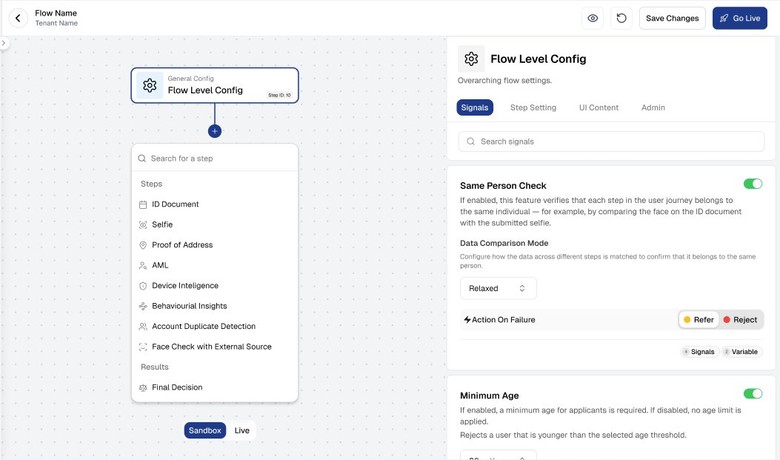
Build, test, and publish identity verification journeys visually. Configure document types, fraud signals, AML checks, and UI themes, and publish changes across supported channels and SDKs.
Built for Enterprise Integration
No-Code
Journey configuration
Centralised
Cross-channel configuration
Sandbox
Test before production
How it works
Configure onboarding journeys in minutes, no engineering required.
1
Create a flow from scratch or a template
Start from a blank canvas or choose from pre-built flow templates (KYC+AML, Document-only, Biometric Auth) and customise from there.
2
Add and configure verification blocks
Drag blocks onto the canvas: ID Document, Selfie, Proof of Address, AML, Device Intelligence, Behavioural Insights, Duplicate Detection, and more.
3
Set actions on failure and thresholds
Configure each block's failure action (Refer/Reject), signal toggles, match thresholds, and accepted document types.
4
Test in Sandbox then go live
Run test journeys in Sandbox mode, review results in Studio, then publish to Live with one click, changes are managed centrally across supported channels and SDKs.
Why Enterprises Choose IDWise for Flow Builder
01
Ship without code
Compliance and product teams launch new document requirements, regional flows, and product variants without engineering tickets.
02
Centralised configuration
Journey config lives outside the app binary, publish changes centrally across iOS, Android, Web, React Native, and Flutter.
03
Theme designer built in
Customise the SDK's look and feel, colors, fonts, logos, light/dark mode, per tenant, per flow, from Flow Builder.
04
Sandbox before live
Every flow has a Sandbox environment for safe testing before changes reach your production customers.
Capabilities
Robust, enterprise-grade features built for regulated industries
Visual Journey Builder
Drag-and-drop canvas with blocks for all IDWise capabilities, connected top-to-bottom in a linear verification flow.
Block Configuration
Each block has a full configuration panel: accepted doc types, signal toggles, thresholds, failure actions, and Signals/Variable chips.
Theme Designer
Full SDK theme customisation including primary color, button styles, fonts, logo, dark/light mode, per tenant and per flow.
Sandbox & Live Environments
Every flow runs in both Sandbox and Live environments. Toggle between environments in Studio to test changes safely.
Feature detail
Everything you need for flow builder
ID Document, Selfie, Proof of Address, AML, Device Intelligence, Behavioural Insights, Duplicate Detection, Ban List, Face Biometric Authentication, KYC Renewal, Questionnaire.
Customise the SDK UI: primary color, logo, button style, fonts, and dark/light mode, per tenant, per flow, without code.
Test journeys in Sandbox mode using test documents. Review step results in Studio before publishing to Live.
Create separate flows for different product lines, regions, or customer segments, each with independent configuration and themes.
Built for Enterprise Integration.
Simple API & SDK
Start with a few lines of code. Full sandbox, webhooks for every event, and docs your engineers will use.
Consistent controls across supported channels
Same fraud models, document coverage, and UX on iOS, Android, Web, React Native, and Flutter.
iOSAndroidWebReact NativeFlutterREST API
</> View documentation
// Start a journey with flow-builder
const journey = await idwise.startJourney({
  flowId: 'your_flow_id',
  referenceNo: 'USR_000001'
});

// Receive result via webhook
app.get('journey/v2/get/12345667899', (req) => {
  const { decision } = req.body;
  // Passed | Refer | Rejected
});
Frequently asked questions
No. Flow Builder is designed for compliance and product teams to operate independently. Adding a new document type, changing thresholds, or launching a new regional flow requires no engineering work.
Instantly. Journey configuration lives outside the app binary, published changes propagate to all connected SDKs (iOS, Android, Web, React Native, Flutter) without an app store release.
Yes. You can create as many flows as needed, each with independent configuration, document types, fraud signal settings, AML configuration, and UI themes.
Sandbox mode is an isolated testing environment for every flow. You can run test journeys, review results in Studio, and validate configuration before publishing to your Live production environment.
Talk to an IDWise Specialist about Flow Builder
Discuss your markets, regulatory requirements, risk controls and integration architecture with our team, and see how IDWise fits your operating model.